Check access and agree on the run before readying up
Co-op is a team run, not a solo attempt with extra spectators. Start in the game’s Co-op menu and check whether your account currently has access. The client supports invite-only and paused availability messages. If either appears, this guide cannot unlock the mode or override the server; follow the availability shown in the game.
Choose what the group is trying to do before anyone spends supplies: a first clear, a better regional time, or learning a particular encounter. A group split between exploring and rushing a record will make conflicting decisions even when every individual build is sensible. Keep the destination and difficulty visible while everyone confirms the plan.
Set the room to a map everyone has unlocked
The current room only permits maps and difficulties unlocked by the whole team, and identifies a player who does not have the selected destination. Resolve that before starting instead of assuming the host’s progress applies to everyone. The room also warns about version differences; a player on an older tab should update the game before another connection attempt.
Use the room link or the in-game invitation controls when your group is ready. Change your Pokémon through your own room card. Choose your Bag items in the lobby below the difficulty before readying up; they are consumed only if the match starts. Agree on whether these supplies serve the shared goal instead of spending them by habit. Check the final selection, map and difficulty once more, especially after someone leaves or joins. The Start flow waits for peer connections; repeated ready clicks do not repair a blocked connection.
Pick complementary jobs without inventing an MMO party
You do not need a rigid tank, healer and damage lineup to learn a map. Start with the failure you expect: enemies closing the route, a boss taking too long, or a teammate repeatedly losing health. Choose partners and attacks that address those problems, then check whether their useful effects actually benefit the team or only their owner.
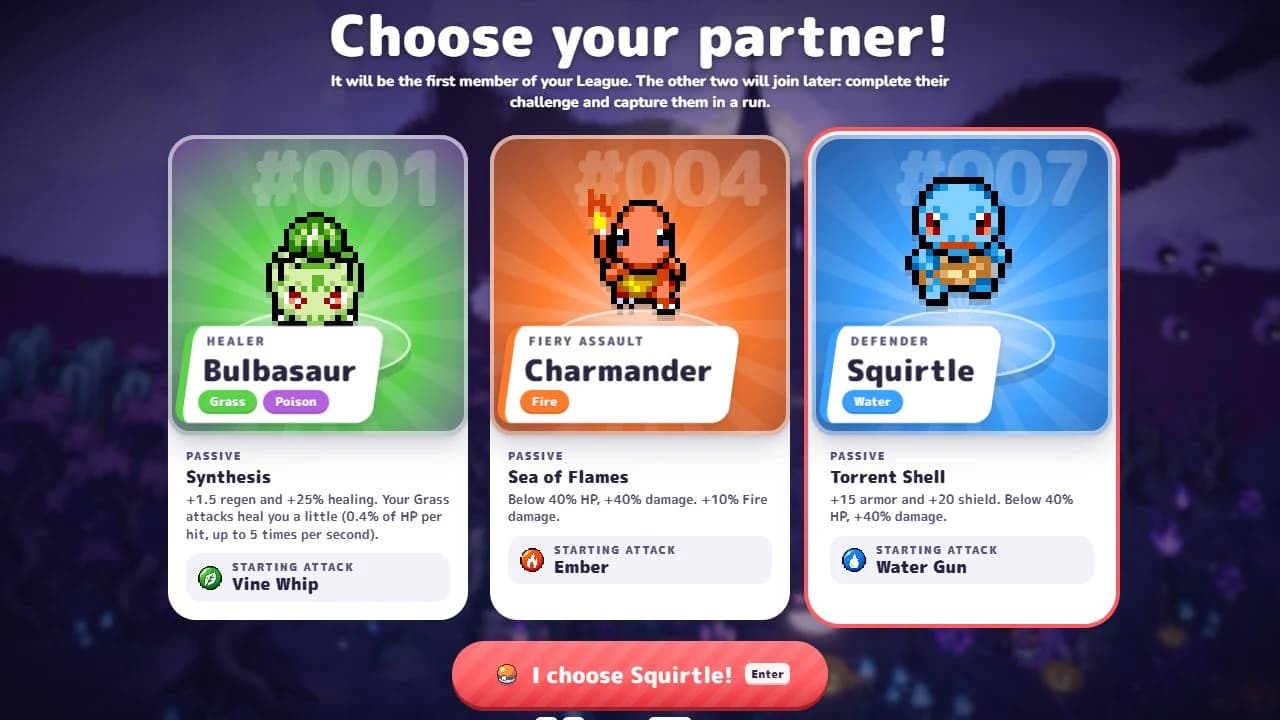
Squirtle’s protection makes its own player more forgiving to pilot. Bulbasaur’s healing depends on its own attacks connecting. Neither passive is a reason to promise the group a universal taunt or a party-wide heal. Keep the actual move descriptions open when evaluating a support plan; a familiar Pokémon role from another game is not evidence of a mechanic here.
For a first clear, two players who stay alive and cover a route can be more useful than a fragile burst plan copied without its required upgrades. Once the group is consistent, compare what each player contributed and change one partner or attack choice at a time. The solo opening tier model is not a measured team-composition ranking.
Revive by making room, then holding E
Go beside a downed teammate and hold E to revive. The official notes give a one-minute revive window. Identify the safe approach before running directly through the enemies that downed them. If a second player falls while attempting a rescue, the team has traded one recoverable problem for two.
One surviving player can draw pressure away while another approaches the revive. That is a movement plan, not a guaranteed aggro-lock mechanic. Watch the actual enemy positions and be ready to adjust. Hold the interaction rather than repeatedly tapping it, and look for its progress before assuming a lagging response means you should abandon the rescue.
- Check the downed teammate’s position and the nearby crowd.
- Create a safe approach; avoid bringing a second crowd to the rescue.
- Stand beside the teammate and hold E while watching progress.
- Regroup before returning to pickups or the next portal.
Gather at the portal and ignore obsolete boss advice
To move to the next zone, the team needs to be in the portal. It appears in the same place for everyone. If progression seems stuck, check who is still outside rather than searching for a different portal or immediately leaving the room. A player still collecting across the map can hold up the transition.
Version 0.8.46 removed the prior seal barriers, Wrath, shifting team weaknesses and linked elite pairs. Bosses and elites returned to fighting like their solo counterparts. Older videos can therefore describe mechanics that your current room no longer has. Judge the encounter in front of you and compare the patch version before following a specific old positioning script.
Handle connection problems through the room
Co-op needs browser peer-to-peer connections through WebRTC. If the game reports that these connections are blocked, use its troubleshooting message and compare a supported browser. Do not enter credentials into a site claiming it can unlock a room, and do not disable unrelated security protections just to test an invitation.
The official notes describe rejoining after a dropped connection and returning to the same room when a run ends. That is useful recovery behavior, not a promise that every interruption preserves every result. After reconnecting, confirm the shared map and team state before acting on what the screen showed before the disconnect.
Choose a cosmetic goal the whole run can support
The co-op leaderboard requires every team member to have an account. The game states that a co-op run also contributes to each player’s individual leaderboard, subject to its validity rules. A private planning board on this site cannot submit a team record or verify whether the server accepted a particular attempt.
Most Mastery Look challenges now count in co-op. A win means the team wins, but the other conditions still check your own actions: a teammate’s attack choice does not satisfy your move requirement. Challenges that allow at most a specified number of hits remain solo-only, so read the objective before inviting the group. These rules apply to completed runs under the updated system; do not expect an old attempt to be credited again. The shrine legendary’s shiny roll is also shared by the team: if it is shiny for one player, it is shiny for everyone. Finish the session with a specific next goal, whether that is safer revives, a cleaner portal transition or meeting your own move condition.
Check move kits, fusion recipes and Lab costs
Check a partner’s kit, compare two fusion ingredients or add up your next Lab purchase before starting another run.